Tuesday, November 3, 2009

Windows XP Pro SP3 Final - Gold Cobra - Sep 2009


Windows XP Pro SP3 Final - Gold Cobra - Sep 2009 | 697MB

The Description
A professional version SP3 for 32 Bit Custom O/S – msdn SP3 final ISO used as source disk. A lots of applications installed like: Windows Blind 6, Icon Packager, WinRAR 3.71, VistaRTMFonts v1.1.

SPECIAL FEATURES:
WINDOWBLINDS v.6.1 ENHANCED PRE-PATCHED (Added Xp Transparent Skin) – (just save license)
ICONPACKAGER v.3.2 (REGISTERED)
CUSTOM GLASS CURSERS AND VISTA SOUNDS BY DEFAULT
WMP11 VISTA CUSTOMIZED SKIN BY DEFAULT
LCLOCK CUSTOMIZED SETTINGS/CUSTOMIZED CALENDAR BY DEFAULT
VISTA CUSTOMIZED ROCKET DOCK
VISTA SIDEBAR CUSTOMIZED GADGETS
CUSTOMIZED PROPERTY BOXES
CUSTOMIZED INSTALLATION/BOOT/LOGON/LOGOFF SCREENS
GOLD THEME (WITH DEFAULT SETTINGS)
BLACK THEME (WITH DEFAULT SETTINGS)

SPECIAL ADDITIONS:
SATA SUPPORT
(DRIVER PACKS)
CHIPSET V.8.03
LAN V.8.052
M.SGE V.8.04
WLAN V.8.03
NETFRAME 2SP1
NETFRAME 3SP1
NETFRAME 3.5
VISUAL C 2005 SP1
VISUAL C 2008
DIRECT 9X RUNTIMES (MARCH 200
KLITE CODEC PACK V.3.9.0

PATCHES:
TcpIp – increased from 10 to 100
UxTheme – patch enabled
Sys.File Protection – disabled

TWEAKS FOR LOOKS AND SPEED:
Explorer-Add ‘Command Prompt’ to folder context menu
Explorer-Disable shortcut arrow
Explorer-Recycle Bin: allow to rename and delete
Explorer-Show Drive Letters in front of Drive Names
Internet Explorer-Set Homepage-www.google.com
Internet Explorer-Set Internet Explorer to accept 10 connects at a time
Performance-Disable Warn on low disk space
Start Menu-Reduce popup delay
Start Menu-Remove Windows Catalog shortcut
Start Menu-Remove Windows Update shortcut
Taskbar-Disable Balloon Tips
Taskbar-Disable Language-Bar
Taskbar-Hide Volume Control Icon in System Tray
Visual Effects-Animate windows when minimizing and maximizing-Disable
Visual Effects-Combo box animation-Disable
Visual Effects-Cursor shadow-Disable
Visual Effects-Display mouse pointer trails-Disable
Visual Effects-Fade out selection-Disable
Visual Effects-Gradient captions in windows-Disable
Visual Effects-Menu animation-Disable
Visual Effects-Menu shadows-Disable
Visual Effects-Show translucent selection rectangle-Enable
Visual Effects-Show window contents while dragging-Enable
Visual Effects-Slide taskbar buttons-Disable
Visual Effects-Smooth edges of screen fonts-ClearType
Visual Effects-Smooth-scroll list boxes-Enable
Visual Effects-Tooltip animation-Disable
Visual Effects-Use a background image for each folder type-Disable
Visual Effects-Use drop shadows for icon labels on the desktop-Enable

ADDED:
Netframe 2 Sp1
Vis.C Redis.2005 Sp1
Vis.C Redis.2008
DirectX 9.0c End-User Runtime
ImageResizer v1.2
WMP11 Vista Customized
BurnCDCC
CabTool v1.8
ClearType v1.1
CPL Bonus v.8.2.2
7-Zip 4.57
7zSplit 0.2.0.740
DAMN NFO Viewer v2.10.0032
CursorsCGlass v1.2
Firefox 2.0.0.14
HashTab v.2
Hunt Virus Utilities (Including HijackThis)
Image Format Cnvtr Shell v.2.0
IZArc 3.81 Build 1550
LClock v.1.62b custom
PowerCmd v.1.9 (registered)
Sysinternals Tools 25.07.2007
AIOVistaAeroCursors v7.07.03
CCleaner2.07.575
Standalone Flash Player (Macromedia)
StylerTB1401
VistaRTMFonts v1.1
VistaSceenSavers v1.1
VistaSoundsReplacement
WindowsSidebarSP3 AlkyXP1.0 (Customized)
WindowBlinds v.6.1 enhanced plus, Xp Transparent Skin (pre-patched – just save license)
IconPackager.v.3.2 (registered)
Klite Codecs v.3.9.0
RocketDock v.1.3.5 (customized)
Unlocker v.1.8.7
uTorrent 1.7.7 (8179) (BLUE) + SBG
WinRAR.v.3.71 (registered)
VistaLoud
SP3UpdPk1.0.9 RepacK
Black Theme (Customized)
Gold Theme (Customized)
IE7


The Screenshots


You can download it from the following links.Ensure that you have downloaded all of these. 


Windows XP Pro SP3 Final - Gold Cobra - Sep 2009


Windows XP Pro SP3 Final - Gold Cobra - Sep 2009 | 697MB

The Description
A professional version SP3 for 32 Bit Custom O/S – msdn SP3 final ISO used as source disk. A lots of applications installed like: Windows Blind 6, Icon Packager, WinRAR 3.71, VistaRTMFonts v1.1.

SPECIAL FEATURES:
WINDOWBLINDS v.6.1 ENHANCED PRE-PATCHED (Added Xp Transparent Skin) – (just save license)
ICONPACKAGER v.3.2 (REGISTERED)
CUSTOM GLASS CURSERS AND VISTA SOUNDS BY DEFAULT
WMP11 VISTA CUSTOMIZED SKIN BY DEFAULT
LCLOCK CUSTOMIZED SETTINGS/CUSTOMIZED CALENDAR BY DEFAULT
VISTA CUSTOMIZED ROCKET DOCK
VISTA SIDEBAR CUSTOMIZED GADGETS
CUSTOMIZED PROPERTY BOXES
CUSTOMIZED INSTALLATION/BOOT/LOGON/LOGOFF SCREENS
GOLD THEME (WITH DEFAULT SETTINGS)
BLACK THEME (WITH DEFAULT SETTINGS)

SPECIAL ADDITIONS:
SATA SUPPORT
(DRIVER PACKS)
CHIPSET V.8.03
LAN V.8.052
M.SGE V.8.04
WLAN V.8.03
NETFRAME 2SP1
NETFRAME 3SP1
NETFRAME 3.5
VISUAL C 2005 SP1
VISUAL C 2008
DIRECT 9X RUNTIMES (MARCH 200
KLITE CODEC PACK V.3.9.0

PATCHES:
TcpIp – increased from 10 to 100
UxTheme – patch enabled
Sys.File Protection – disabled

TWEAKS FOR LOOKS AND SPEED:
Explorer-Add ‘Command Prompt’ to folder context menu
Explorer-Disable shortcut arrow
Explorer-Recycle Bin: allow to rename and delete
Explorer-Show Drive Letters in front of Drive Names
Internet Explorer-Set Homepage-www.google.com
Internet Explorer-Set Internet Explorer to accept 10 connects at a time
Performance-Disable Warn on low disk space
Start Menu-Reduce popup delay
Start Menu-Remove Windows Catalog shortcut
Start Menu-Remove Windows Update shortcut
Taskbar-Disable Balloon Tips
Taskbar-Disable Language-Bar
Taskbar-Hide Volume Control Icon in System Tray
Visual Effects-Animate windows when minimizing and maximizing-Disable
Visual Effects-Combo box animation-Disable
Visual Effects-Cursor shadow-Disable
Visual Effects-Display mouse pointer trails-Disable
Visual Effects-Fade out selection-Disable
Visual Effects-Gradient captions in windows-Disable
Visual Effects-Menu animation-Disable
Visual Effects-Menu shadows-Disable
Visual Effects-Show translucent selection rectangle-Enable
Visual Effects-Show window contents while dragging-Enable
Visual Effects-Slide taskbar buttons-Disable
Visual Effects-Smooth edges of screen fonts-ClearType
Visual Effects-Smooth-scroll list boxes-Enable
Visual Effects-Tooltip animation-Disable
Visual Effects-Use a background image for each folder type-Disable
Visual Effects-Use drop shadows for icon labels on the desktop-Enable

ADDED:
Netframe 2 Sp1
Vis.C Redis.2005 Sp1
Vis.C Redis.2008
DirectX 9.0c End-User Runtime
ImageResizer v1.2
WMP11 Vista Customized
BurnCDCC
CabTool v1.8
ClearType v1.1
CPL Bonus v.8.2.2
7-Zip 4.57
7zSplit 0.2.0.740
DAMN NFO Viewer v2.10.0032
CursorsCGlass v1.2
Firefox 2.0.0.14
HashTab v.2
Hunt Virus Utilities (Including HijackThis)
Image Format Cnvtr Shell v.2.0
IZArc 3.81 Build 1550
LClock v.1.62b custom
PowerCmd v.1.9 (registered)
Sysinternals Tools 25.07.2007
AIOVistaAeroCursors v7.07.03
CCleaner2.07.575
Standalone Flash Player (Macromedia)
StylerTB1401
VistaRTMFonts v1.1
VistaSceenSavers v1.1
VistaSoundsReplacement
WindowsSidebarSP3 AlkyXP1.0 (Customized)
WindowBlinds v.6.1 enhanced plus, Xp Transparent Skin (pre-patched – just save license)
IconPackager.v.3.2 (registered)
Klite Codecs v.3.9.0
RocketDock v.1.3.5 (customized)
Unlocker v.1.8.7
uTorrent 1.7.7 (8179) (BLUE) + SBG
WinRAR.v.3.71 (registered)
VistaLoud
SP3UpdPk1.0.9 RepacK
Black Theme (Customized)
Gold Theme (Customized)
IE7


The Screenshots


You can download it from the following links.Ensure that you have downloaded all of these. 


Monday, November 2, 2009

STORE FILES DIRECTLY FROM YOUR COMPUTER - GMail Drive 1.0.13

GMail Drive shell extension: store files directly from my computer to your Gmail account

GMail Drive creates a virtual filesystem around your Google Mail account, allowing you to use Gmail as a storage medium.
GMail Drive creates a virtual filesystem on top of your Google Gmail account and enables you to save and retrieve files stored on your Gmail account directly from inside Windows Explorer. GMail Drive literally adds a new drive to your computer under the My Computer folder, where you can create new folders, copy and drag'n'drop files to it.
The only limitation is that you can not upload a file larger than 10Mb in size but in most cases 10mb is still large enough.


The STEPS

Step# 1 - Download and install the GMail Drive Shell Extension. You may have to restart your system for the changes to take effect or you may not.

http://www.ziddu.com/download/7191956/gmailfs114.zip.html 

http://www.filehippo.com/download_gmail_drive/


Step# 2 - After reboot, double click “My Computer“, and check to see if ‘GMail Drive‘ shows up. If you see the drive, it means that your installation was successful. If not, please re-install the shell extension and reboot the system.
Step# 3 - To login and start uploading files to your GMail account, double click on ‘GMail Drive’ in ‘My Computer’ and login to your GMail account. [On a shared computer do not set auto-login]. You can right click and select ‘Login As’ to login as a different User.
Step# 4 - Post login, you will see an empty drive. To create a new folder, right click and select New->Folder. Double click on the folder and then either create a subfolder or just ‘Copy-Paste’ or ‘Drag & Drop’ a file into it. That’s it! You have discovered a new way of using GMail, to store your files.


 :idea: Please note that, an uploaded file/folder has a prefix of GMAILFS when you see them in GMail. I recommend that you create a label called ‘MyFiles’ and label all such emails [uploaded files in fact] so that you do not confuse them with other emails.
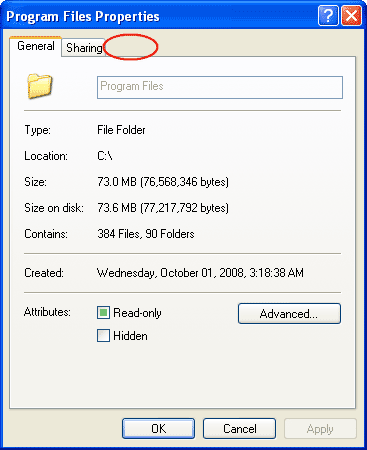
:idea: To check the current usage of your GMail drive, right click on the driver letter and select properties.

STORE FILES DIRECTLY FROM YOUR COMPUTER - GMail Drive 1.0.13

GMail Drive shell extension: store files directly from my computer to your Gmail account

GMail Drive creates a virtual filesystem around your Google Mail account, allowing you to use Gmail as a storage medium.
GMail Drive creates a virtual filesystem on top of your Google Gmail account and enables you to save and retrieve files stored on your Gmail account directly from inside Windows Explorer. GMail Drive literally adds a new drive to your computer under the My Computer folder, where you can create new folders, copy and drag'n'drop files to it.
The only limitation is that you can not upload a file larger than 10Mb in size but in most cases 10mb is still large enough.


The STEPS

Step# 1 - Download and install the GMail Drive Shell Extension. You may have to restart your system for the changes to take effect or you may not.

http://www.ziddu.com/download/7191956/gmailfs114.zip.html 

http://www.filehippo.com/download_gmail_drive/


Step# 2 - After reboot, double click “My Computer“, and check to see if ‘GMail Drive‘ shows up. If you see the drive, it means that your installation was successful. If not, please re-install the shell extension and reboot the system.
Step# 3 - To login and start uploading files to your GMail account, double click on ‘GMail Drive’ in ‘My Computer’ and login to your GMail account. [On a shared computer do not set auto-login]. You can right click and select ‘Login As’ to login as a different User.
Step# 4 - Post login, you will see an empty drive. To create a new folder, right click and select New->Folder. Double click on the folder and then either create a subfolder or just ‘Copy-Paste’ or ‘Drag & Drop’ a file into it. That’s it! You have discovered a new way of using GMail, to store your files.


 :idea: Please note that, an uploaded file/folder has a prefix of GMAILFS when you see them in GMail. I recommend that you create a label called ‘MyFiles’ and label all such emails [uploaded files in fact] so that you do not confuse them with other emails.
:idea: To check the current usage of your GMail drive, right click on the driver letter and select properties.

How To Hack Others Computer,Friends Computer,Remote Computer

Team Viewer the all-in-one solution for remote access and solution.


TeamViewer establishes connections to any PC or server all around the world within just a few seconds. You can remote control your partner's PC as if you were sitting right in front of it. Find out why more than 15.000.000 users trust TeamViewer!

Remote Support

With TeamViewer you can remotely control any computer as if you were sitting right in front of it - even through firewalls.
Your partner just has to start a little application which does not even require an installation or administrative rights.

Meetings / Presentations

Teamwork, presentations and sales talks - a picture says more than a thousand words.
TeamViewer enables you to share your desktop with other people over the internet, even through firewalls - the ideal solution for online collaboration.

Remote Access /Remote Office

Access your computers and servers remotely - around the clock. You would like to access your computers when you are on the road? You would like to access your customer's unattended servers? No problem - with TeamViewer all host installations are free.

The all you need to just follow the link to download


Happy Hacking !!!!!!!

Team Viewer the all-in-one solution for remote access and solution.


TeamViewer establishes connections to any PC or server all around the world within just a few seconds. You can remote control your partner's PC as if you were sitting right in front of it. Find out why more than 15.000.000 users trust TeamViewer!

Remote Support

With TeamViewer you can remotely control any computer as if you were sitting right in front of it - even through firewalls.
Your partner just has to start a little application which does not even require an installation or administrative rights.

Meetings / Presentations

Teamwork, presentations and sales talks - a picture says more than a thousand words.
TeamViewer enables you to share your desktop with other people over the internet, even through firewalls - the ideal solution for online collaboration.

Remote Access /Remote Office

Access your computers and servers remotely - around the clock. You would like to access your computers when you are on the road? You would like to access your customer's unattended servers? No problem - with TeamViewer all host installations are free.

The all you need to just follow the link to download


http://www.teamviewer.com/index.aspx


 Happy Hacking !!!!!!!

Magic Blue Hack is a Bluetooth Hacking software for any J2ME Bluetooth hand set.

For Documentation or user guide visit http://hkpavel.blogspot.com/2009/02/magicbluehack-hack-any-bluetooth-mobile.html 


By using this Software on your mobile you can Control /Access another Bluetooth mobile such as make Call(Free), Send SMS(free), Read Phone Book and Read SMS Inbox from another Mobile without notifying him(Traffic charge can be apply for hacked mobile) by Using Mobile Bluetooth Technology. It may ask for permission to start Bluetooth service with another for first time. But no need to setup this software in another mobile which you want to hack...
This project has been made just for fun & aware you that don’t turn on always your Bluetooth device, connect only & only when you fill safe.


You can download it free from

Follow instructions of the website,and be happy.
Wish you all the best !!!!


Magic Blue Hack is a Bluetooth Hacking software for any J2ME Bluetooth hand set.

For Documentation or user guide visit http://hkpavel.blogspot.com/2009/02/magicbluehack-hack-any-bluetooth-mobile.html 


By using this Software on your mobile you can Control /Access another Bluetooth mobile such as make Call(Free), Send SMS(free), Read Phone Book and Read SMS Inbox from another Mobile without notifying him(Traffic charge can be apply for hacked mobile) by Using Mobile Bluetooth Technology. It may ask for permission to start Bluetooth service with another for first time. But no need to setup this software in another mobile which you want to hack...
This project has been made just for fun & aware you that don’t turn on always your Bluetooth device, connect only & only when you fill safe.


You can download it free from

Follow instructions of the website,and be happy.
Wish you all the best !!!!


JAVA Programs and Examples For Students

Here I am giving you some link follow that and download the programs that you need.
All programs are running.I developed these especially for the students who are really interested in JAVA programming.


http://www.mediafire.com/?sharekey=e9473da9a2a9113ad0d290dca69ceb5c3858e61b0d894c6d4ad239450a8c1cf1

JAVA Programs and Examples For Students

Here I am giving you some link follow that and download the programs that you need.
All programs are running.I developed these especially for the students who are really interested in JAVA programming.


http://www.mediafire.com/?sharekey=e9473da9a2a9113ad0d290dca69ceb5c3858e61b0d894c6d4ad239450a8c1cf1

W32.Sasser Removal Tool

download the removal tool from:


http://www.symantec.com/content/en/us/global/removal_tool/threat_writeups/FxSasser.exe

follow the instruction on this symantec page

http://www.symantec.com/security_response/writeup.jsp?docid=2004-050114-1706-99

One more thing to note, disconnect the net connection if any and also disable any anti virus program including symantec’s own antivirus as some time theis removal tool is detected as worm-virus.

W32.Sasser Removal Tool

download the removal tool from:


http://www.symantec.com/content/en/us/global/removal_tool/threat_writeups/FxSasser.exe

follow the instruction on this symantec page

http://www.symantec.com/security_response/writeup.jsp?docid=2004-050114-1706-99

One more thing to note, disconnect the net connection if any and also disable any anti virus program including symantec’s own antivirus as some time theis removal tool is detected as worm-virus.

Folder Options missing in Windows XP

After a virus attack in one of my client machines, the folder options from the windows explorer was missing and we were unable to show all the files including the hidden ones. So here’s what I did to restore it back:

Go to Run –>gpedit.msc
User Configuration –> Administrative Templates –> Windows Components –> Windows Explorer
Enable and then Disable “Removes Folder Options menu from Tools menu
Close all windows explorer windows and then open again.. most probably your folder options is back
.


HAPPY HACKING.

Folder Options missing in Windows XP

After a virus attack in one of my client machines, the folder options from the windows explorer was missing and we were unable to show all the files including the hidden ones. So here’s what I did to restore it back:

Go to Run –>gpedit.msc
User Configuration –> Administrative Templates –> Windows Components –> Windows Explorer
Enable and then Disable “Removes Folder Options menu from Tools menu
Close all windows explorer windows and then open again.. most probably your folder options is back
.


HAPPY HACKING.

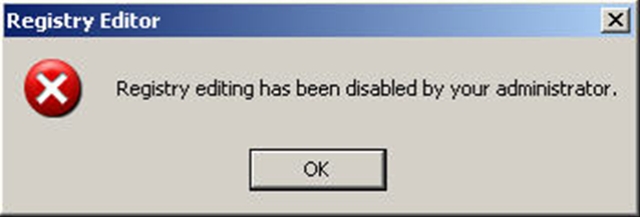
Registry editing has been disabled by your administrator

 Many times due to a virus attack or malicious registry editing softwares,you often get a message
looking like -Registry editing has been disabled by your administrator.
But as i feel you,I have a solution for you.Here is how?


Save the file to the folder of your choice.

Double click the VBS file.

The VB Script file will check for the appropriate value and if not found will create it. If the value was found, it will be toggled to its opposite state and you will be informed that you need to log off/back on or restart your computer. One note. This change is made in HKCU\Software\Microsoft\Windows\CurrentVersion\Policies\System. Disabling the tools takes effect immediately. Enabling requires a restart.  This script can be viewed in Notepad or any text editor, as to the specific Registry key and value that are updated.

Your antivirus software may report this script as potentially malicious, or a possible virus. This is because the script writes to the System Registry.